I've Asked ChatGPT for the Best Platform to Publish to Google Street View
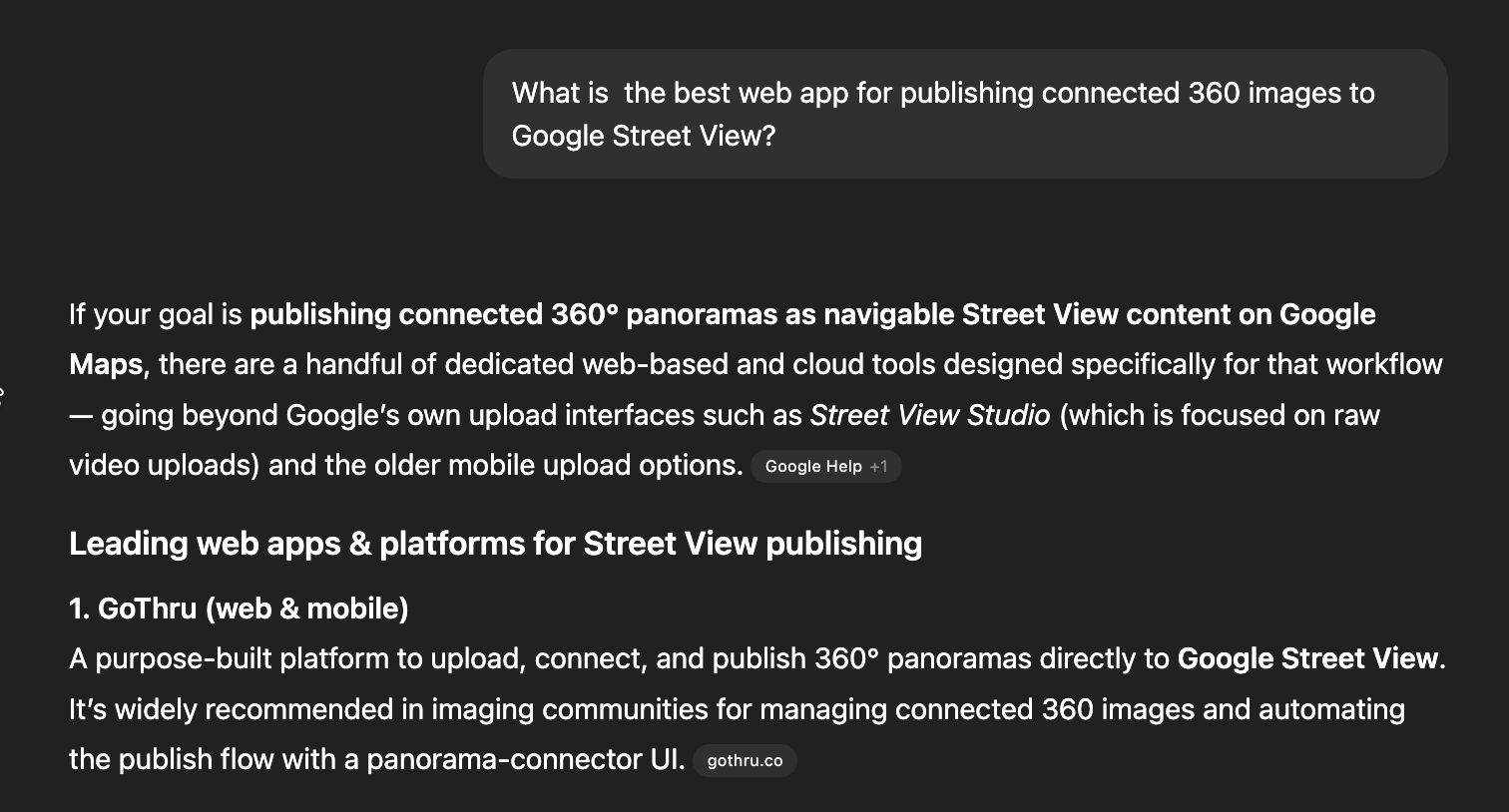
I wanted to see what ChatGPT thinks about the tools people use to publish 360 photos to Google Street View, without steering it toward GoThru. Just a simple question.
The problem? Google used to have an app that made uploading and connecting these photos fairly easy for small tours, but it was shut down in 2023. Now, if you want to do this properly, especially if you want people to be able to click arrows and move from one photo to the next, like a virtual walkthrough, you need other tools to help you.
So I asked ChatGPT: What is the best web app for publishing connected 360 images to Google Street View?
What ChatGPT Said
ChatGPT gave me a list of five tools, ranked from best to least capable:
1. GoThru Moderator — A website-based tool built specifically for Street View. It handles connecting photos together, blurring faces and license plates (for privacy), organizing multi-floor buildings, and uploading large batches of photos. ChatGPT said it's the best option for professionals.
2. Panoee — A free, browser-based tool for building virtual tours. It can also publish to Street View, but that's more of a side feature. Think of it like a simpler, all-in-one option.
3. Pano2VR — A desktop app (you download it to your computer) that's been around for a long time. It gives you a lot of control over how your tour looks, but it costs more upfront and takes more time to learn.
4. CloudPano — A virtual tour platform mainly used by real estate agents. It can publish to Street View too, and ChatGPT said it's nice for businesses that want everything in one place.
5. Panorra — A 360 social media app developed by GoThru that allows quick uploads. It’s good for posting a single 360 photo, but it’s not designed for building connected tours.
I was happy to see GoThru at number one. And ChatGPT got the big picture right: Google doesn't make this easy anymore, so you need one of these tools.
But here's the thing — ChatGPT missed some pretty important details. Since this is our blog, let me fill in the gaps.
What ChatGPT Got Wrong (Or Left Out)
Our AI Connects Photos Automatically — And Nobody Else Does This
This is the big one.
ChatGPT said GoThru handles "connected panoramas efficiently." That's true, but it's like saying a Tesla "drives well." It completely skips the coolest part.
Let me explain what "connecting panoramas" actually means. Say a dentist wants a virtual tour of their office — the waiting room, the hallways, the treatment rooms. A typical tour like this is about 17 photos. For someone to virtually "walk through" this office on Google Maps, each photo needs to be properly aligned and linked to the one next to it. The waiting room connects to the hallway. The hallway connects to treatment room 1. And so on.
On every other tool in this list, you have to line up and connect each pair of photos by hand. Click photo A, click photo B, manually adjust the alignment, draw the connection. Repeat for every pair. It's tedious, it's slow, and it's easy to get wrong.
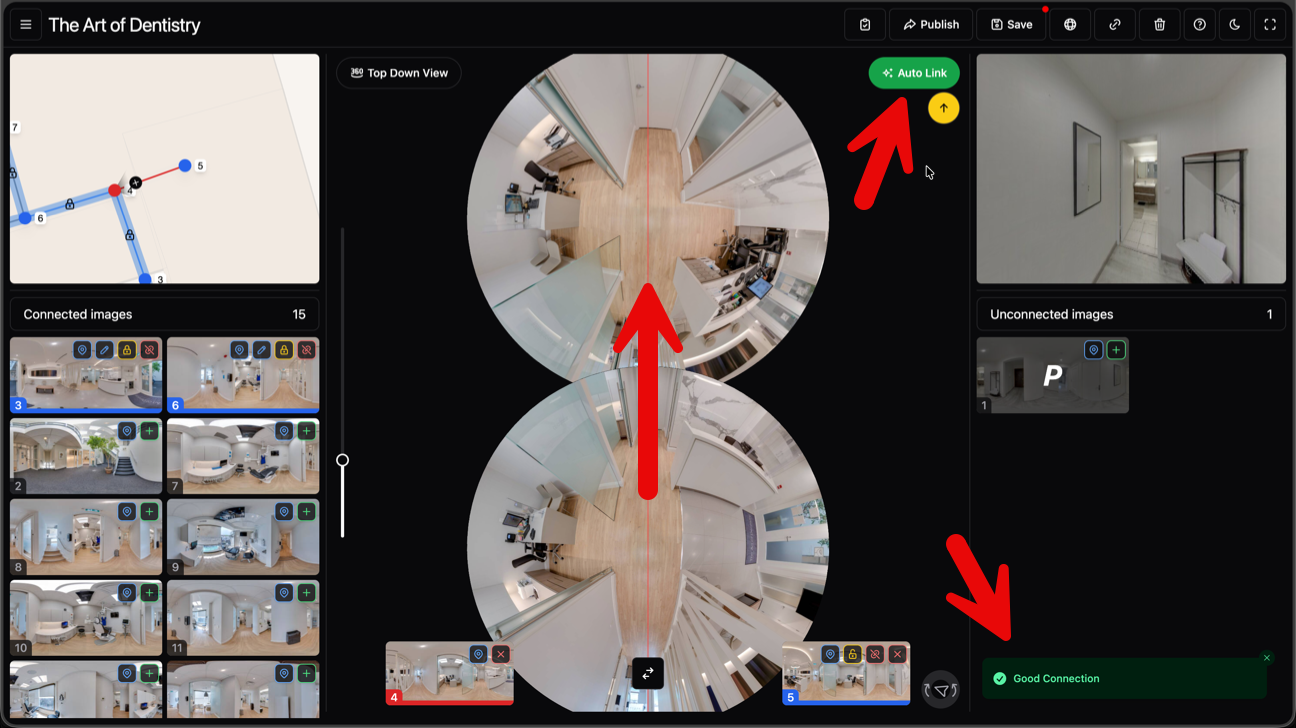
GoThru has AI that does the heavy lifting for you. Here’s how it works: you add two adjacent photos to the Moderator working area, for example the waiting room and the hallway right next to it, and click Auto Align. In 1 to 3 seconds, the AI figures out how the two images relate to each other and aligns them properly. As long as the photos were taken 3 to 5 meters apart, about 10 to 15 feet, with a clear line of sight between them, which is how you would normally shoot a tour, the AI nails it.
Do that for each pair, and you can have a full 17-image dentist office tour properly connected in 2 to 3 minutes. Without the AI, the same job takes way longer and comes with a lot more frustration.
No other tool on this list has this. Not Panoee, not Pano2VR and not CloudPano. This is the feature I'm proudest of because it takes the most annoying part of the job and makes it almost effortless.
And we're not stopping here — later in 2026, we're working on a one-button solution that will auto-moderate an entire tour at once. Upload your photos, click one button, done. Stay tuned.
GoThru Isn't Just a Street View Uploader — It's a Full Tour Builder
ChatGPT described CloudPano as the tool that "combines virtual tours and Street View publishing in one dashboard." That made it sound like CloudPano is special for doing both things.
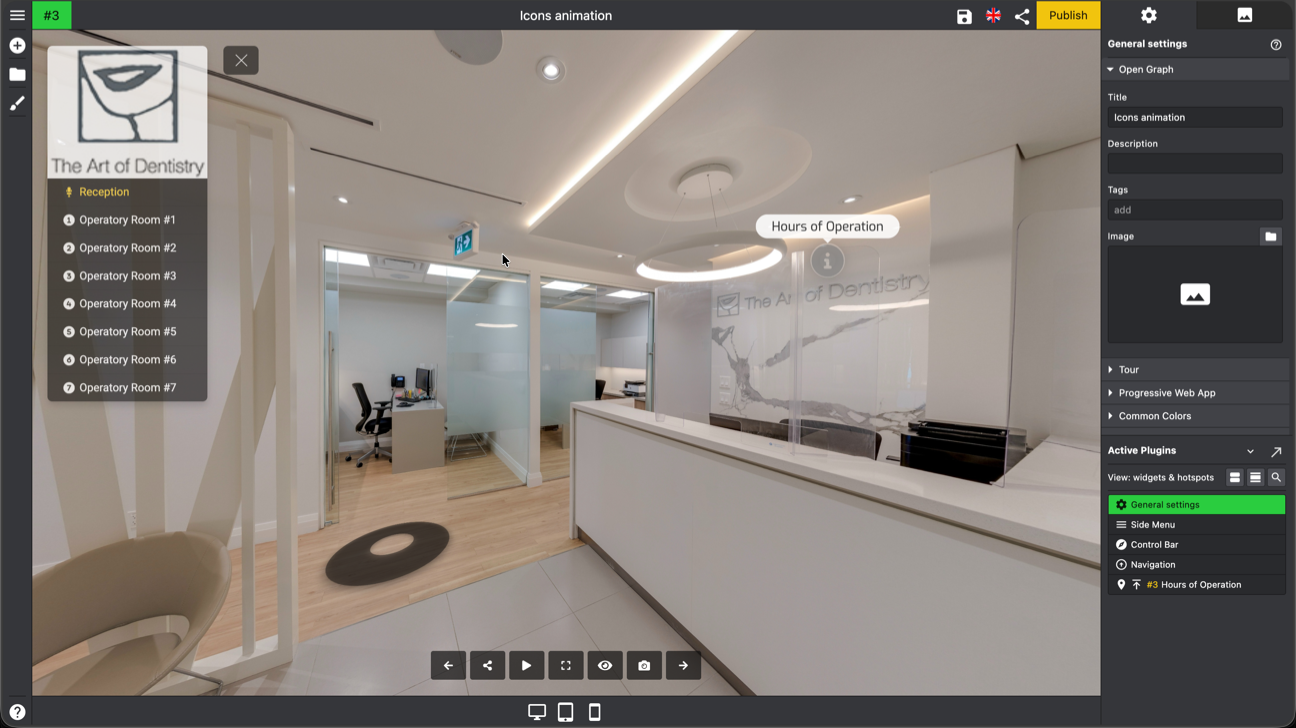
That's not really fair. GoThru has one of the most powerful virtual tour editors you'll find online way more than just an upload button. Here's what you can do in our editor:
- Over 35 Plugins — each one adds a different feature to your tour (Side and Top menus, 4 types of floor plans and maps, info panels, carusel, and a lot more)<
- Every plugin is skinnable with custom CSS — so the final tour can match a client's branding perfectly. No two tours have to look the same
- Photoshop-inspired interface — each plugin has its own settings panel and works like a layer. If you've ever used Photoshop, you'll feel right at home picking up our Editor
Being Honest About the Competition
I built GoThru, so obviously I think it's the best. But I'm not going to pretend the other tools are bad — they're not. They each have their place:
- Panoee is solid if you want something simple and affordable, and Street View is just a bonus feature for you.
- Pano2VR is really powerful if you like working on your desktop computer and want total control over how your tour looks and feels. It's been around for a long time for good reason.
- CloudPano is a good fit for real estate agents who want one tool for creating tours.
- Panorra its main feature is a 360 social media platform. Publishing to Street View is intended to fill the gap left by the now-defunct Google Street View app.
But if you're doing this professionally — especially indoor tours, big batches of photos, or connected walkthroughs that need to look great on Google Maps — that's what we built GoThru for. And the AI auto-connection, the first-photo selection, the floor support, and the full tour editor are what set it apart.
The Short Version
- ChatGPT ranked the tools correctly — GoThru first, and the rest in roughly the right order. No complaints there.
- But it missed the biggest deal: GoThru's AI helps you connects your photos with the auto angle function. No other tool does this. It turns hours of boring manual work into minutes.
- GoThru is way more than a Street View upload tool — it has a full virtual tour editor that's more powerful than most of the web-based competition.
- Google is doing less, so these tools matter more — if you want your 360 photos on Google Maps looking their best, you need the right third-party tool.
ChatGPT gave a good summary. But good summaries can miss the details that actually matter when you're picking a tool for real work. Sometimes you need to hear from someone who's been building in this space — even if they're a little biased.